
RGB MoCap: Free Motion Capture From Video, on Your Own PC
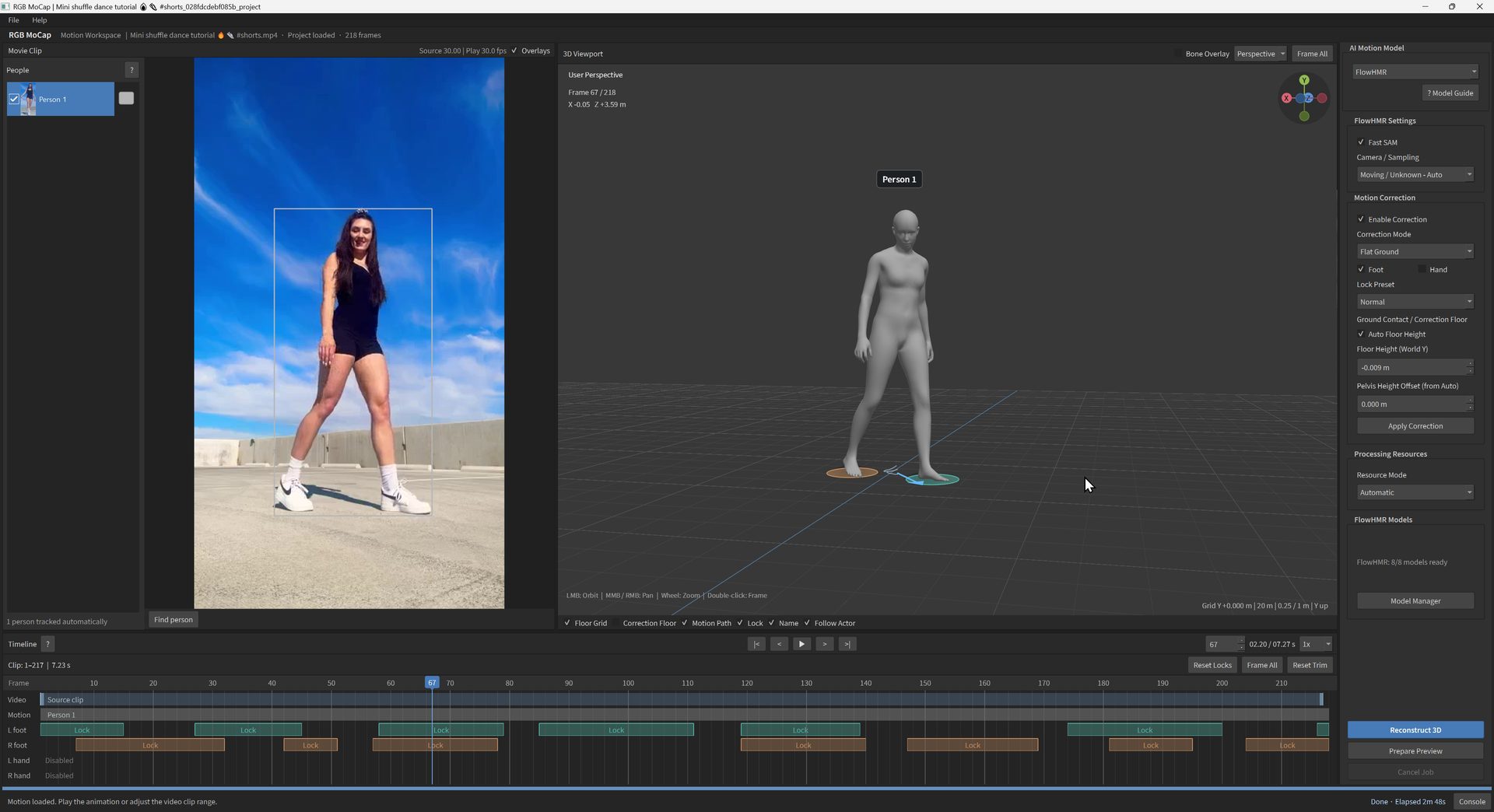
Paid AI mocap services charge a monthly fee to turn a video of you dancing into an animation file. RGB MoCap does the same job on your own Windows PC for free. Point it at a video, pick an AI model, click Reconstruct 3D, and you get a body animation you can fix up and export to your engine.
It's made by toyxyz and went up on GitHub on October 26, 2026. Less than a month later it has over 2,200 stars. The app's own code is MIT licensed. The AI models it runs keep their own licenses, and some of them need you to register before you download.
Watch it in action
This video from the tiedtke. channel covers RGB MoCap and why it puts pressure on paid mocap subscriptions:
How it works
The workflow is four steps:
- Pick an AI model and get its files with the built-in Model Manager, then open a video.
- Use Find person to choose who to track, or let it pick people up automatically.
- Click Reconstruct 3D and review the result in the 3D viewport.
- Fix foot and hand contacts on the timeline, click Apply Correction, and export.
Step 4 is the part that matters for games. Video mocap has a classic problem: feet slide across the floor. RGB MoCap marks when each foot (and optionally each palm) is planted, shows those locks as bars on the timeline, and lets you drag them around before it pins the limbs in place. In the screenshot above, the green and orange bars are the left and right foot locks for a 7-second dance clip.
Seven AI models in one app
RGB MoCap doesn't do the pose estimation itself. It wraps research models and gives them one interface:
- ExMR: the README's pick for overall motion quality. Includes fingers.
- FlowHMR: includes fingers, with options to cut its memory use.
- GVHMR: fingers through an optional add-on.
- MAMMA: multi-camera capture from several synced videos.
- PromptHMR: better at placing several people relative to each other, but lower motion quality than ExMR in the author's tests. No fingers.
- GEM-X: fast, with lower motion quality in the author's tests.
- PEAR: experimental live tracking from a webcam. The README warns it may be unstable, and you can't record or export in this mode.
Projects keep a separate result for each model, so you can run the same clip through two of them and keep the better one.
Getting animation into your game
The export list covers most indie pipelines:
- FBX or BVH of the raw animation, with options for A or T reference poses.
- Retargeting onto Mixamo FBX, VRM and PMX characters inside the app.
- UE5 Manny and Quinn: export straight to the stock Unreal mannequin skeleton.
- VMD for MikuMikuDance characters.
- Blender: export a whole project with animation, video and cameras, or stream bones live into Blender while you scrub, then bake them to Actions.
- Unreal Live Link: stream body motion (and face, if you track it) to MetaHuman characters in UE 5.7.
There's also Track Face, which pulls ARKit-style facial expression data from the video and exports it as TXT or as a Live Link Face CSV for Unreal.
What you need
This is not a lightweight download:
- 64-bit Windows, an NVIDIA GPU and OpenGL 4.3.
- About 41 GiB for the three main models (ExMR, FlowHMR, GVHMR) and their runtimes. All six offline models come to about 72 GiB.
- MAMMA and PromptHMR also need Visual Studio 2022 C++ Build Tools and CUDA Toolkit 12.8.
The README publishes measured numbers instead of promises. Its low-memory modes cut peak VRAM from 5.68 to 3.87 GiB for ExMR and from 6.10 to 2.77 GiB for FlowHMR in short tests. That puts the main models within reach of mid-range cards.
Install it (or have an agent do it)
Clone the repo, run install.cmd, then start the app with RGBMoCap.cmd. Model files come separately through Model Manager.
The repo also ships an AGENTS.md and an agent guide, so you can open the folder in a coding agent such as Claude Code or Codex and ask it to check your GPU and disk space, run the installer and walk you through the model downloads. The README is clear on one point: sign-ins and license agreements stay with you. Don't paste passwords or tokens into the agent chat.
Who should try it
If you're building a game with humanoid characters and can't afford a mocap suit or a subscription, RGB MoCap is worth a weekend. Film yourself on a phone, run it through ExMR, clean up the foot locks, and retarget it onto your character. The 40 GB install and the NVIDIA requirement are the price of doing it all locally.
Get it on GitHub. If you make a game with it, submit it here so players can rate it.
No comments yet. Start the conversation.
Sign in to comment